
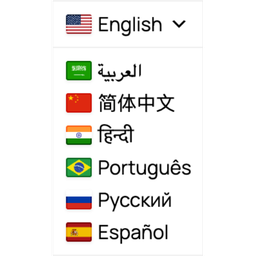
Description
Automatic Translator with Google Translate by Pampa Dev helps you translate WordPress content for visitors with a lightweight Google Translate language switcher. Add a floating selector, place it in a menu, publish it in a widget area, insert it with a shortcode, or use the selector block.
Version 2 makes the language switcher easier to use, easier to place, and easier to style. Visitors get a cleaner translation experience, and site owners get better controls for where the selector appears, which languages are shown, and what content should stay untranslated.
Automatic Translator is a free visitor translation plugin. It changes what visitors see in their browser after they choose a language. It does not create translated URLs, translated posts, hreflang tags, sitemap entries, translated metadata, or SEO-indexable translated pages.
Features
- Free client-side translation powered by the Google Translate website widget
- Custom language switcher for a polished visitor-facing selector
- Translate posts, pages, menus, widgets, theme text, plugin text, and WooCommerce storefront text that appears in the page HTML
- Floating language selector with configurable corner and offset controls
- Menu, widget, shortcode, and selector block placement options
- Language search, selection, ordering, and optional all-languages mode
- Country flags with broad regional flag choices for languages spoken in multiple places
- Styling controls for colors, borders, typography, shadows, icons, and dropdown appearance
- Auto-detect option based on the visitor browser language
- Multiple selectors on the same page with shared translation state
- Advanced exclusion selectors for brand names, code samples, checkout fragments, or other content that should not be translated
- Loads translation tools only when visitors need them
- No paid SaaS account or translation API key required
Free mode and multilingual SEO
Automatic Translator is built for instant visitor translation, not multilingual SEO indexing.
Free client-side translation is useful when visitors need to read your existing site in another language without creating and maintaining translated content. Search engines generally see the original page, because translated versions are not stored on separate URLs.
If you need multilingual SEO, you need a server-rendered translation system with stable language URLs, canonical handling, hreflang, sitemap integration, translated metadata, and translated slugs. Automatic Translator does not claim those features in free mode.
Placement options
You can place the language switcher in several ways:
- Floating selector in the Placement tab (enabled by default).
- Add the selector block in the block editor.
- Add the selector to a classic menu or Navigation block menu.
- Add the Automatic Translator widget to a widget area.
- Insert a shortcode in content or a template.
Supported languages
Automatic Translator supports the languages available through the Google Translate website widget:
- Afrikaans
- Albanian
- Amharic
- Arabic
- Armenian
- Azerbaijani
- Basque
- Belarusian
- Bengali
- Bosnian
- Bulgarian
- Catalan
- Cebuano
- Chichewa
- Chinese (Simplified)
- Chinese (Traditional)
- Corsican
- Croatian
- Czech
- Danish
- Dutch
- English
- Esperanto
- Estonian
- Filipino
- Finnish
- French
- Frisian
- Galician
- Georgian
- German
- Greek
- Gujarati
- Haitian Creole
- Hausa
- Hawaiian
- Hebrew
- Hindi
- Hmong
- Hungarian
- Icelandic
- Igbo
- Indonesian
- Irish
- Italian
- Japanese
- Javanese
- Kannada
- Kazakh
- Khmer
- Korean
- Kurdish (Kurmanji)
- Kyrgyz
- Lao
- Latin
- Latvian
- Lithuanian
- Luxembourgish
- Macedonian
- Malagasy
- Malay
- Malayalam
- Maltese
- Maori
- Marathi
- Mongolian
- Myanmar (Burmese)
- Nepali
- Norwegian
- Pashto
- Persian
- Polish
- Portuguese
- Punjabi
- Romanian
- Russian
- Samoan
- Scots Gaelic
- Serbian
- Sesotho
- Shona
- Sindhi
- Sinhala
- Slovak
- Slovenian
- Somali
- Spanish
- Sundanese
- Swahili
- Swedish
- Tajik
- Tamil
- Telugu
- Thai
- Turkish
- Ukrainian
- Urdu
- Uzbek
- Vietnamese
- Welsh
- Xhosa
- Yiddish
- Yoruba
- Zulu
Privacy Policy
Automatic Translator with Google Translate uses Appsero SDK to collect some telemetry data upon user’s confirmation. This helps us troubleshoot problems faster and make product improvements.
Appsero SDK does not gather any data by default. The SDK only starts gathering basic telemetry data when a user allows it via the admin notice.
Integrating Appsero SDK does not immediately start gathering data without confirmation from users in any case.
Learn more about how Appsero collects and uses this data.
Screenshots

Floating language switcher on a WordPress page. 
Open language selector showing available visitor translation options. 
Language settings for base language, supported languages, ordering, and regional flag choices. 
Visual settings for styling the custom selector. 
Placement settings for floating and menu alternatives. 
Advanced placement with CSS and manual methods: block, widget and shortcodes. 
Block placement example. 
Advanced settings: auto translate toggle and manual translation exclusions with CSS selectors. 
Advanced custom CSS and uninstall cleanup.
Blocks
This plugin provides 1 block.
- Automatic Translator Selector
Installation
- Install the plugin through the WordPress plugin installer, or upload it to
/wp-content/plugins/auto-translate/. - Activate the plugin through the Plugins screen in WordPress.
- Open Translator in the WordPress admin menu.
- Choose your languages, selector style, and placement.
- Visit the frontend and test the language switcher.
FAQ
-
How much does this plugin cost?
-
Automatic Translator is free. It does not require a paid SaaS account or a translation API key.
-
How does Automatic Translator translate my WordPress site?
-
The plugin displays a language switcher on your site. When a visitor selects a language, the plugin loads the Google Translate website widget behind the custom selector and applies client-side translation in the visitor’s browser.
-
Does this create SEO-indexable translated pages?
-
No. Free mode does not create translated URLs, duplicate translated posts, hreflang tags, sitemap entries, translated metadata, translated slugs, or server-rendered translated pages.
It is for instant visitor translation. If multilingual SEO is your goal, use a translation architecture that stores and serves translated content on stable, crawlable language URLs.
-
Does this plugin load Google Translate?
-
Yes. Translation is powered by the Google Translate website widget. In the v2 custom selector path, the plugin lazy-loads Google Translate when translation is needed instead of exposing the default Google widget as the main visitor interface.
-
What privacy considerations apply?
-
When a visitor uses translation, their browser loads Google’s translation script and interacts with Google Translate. If your site requires consent before third-party scripts load, configure your consent tooling so visitors approve Google Translate before using the language switcher.
Automatic Translator with Google Translate uses Appsero SDK to collect some telemetry data upon user’s confirmation. This helps us troubleshoot problems faster and make product improvements.
Appsero SDK does not gather any data by default. The SDK only starts gathering basic telemetry data when a user allows it via the admin notice.
Integrating Appsero SDK does not immediately start gathering data without confirmation from users in any case.
Learn more about how Appsero collects and uses this data.
-
What happened to the classic widget?
-
The legacy classic widget path has been removed. Existing classic installs are migrated to the custom selector experience on upgrade so visitors get the newer v2 language switcher.
-
How can I place the language switcher?
-
Use the Placement tab to enable a floating selector, add it to a menu, or follow the manual placement instructions. You can also use the Automatic Translator widget, the selector block, or the
[auto_translate_button]shortcode. -
Do I need any translation skills to use this plugin?
-
No. The plugin uses automatic machine translation through Google Translate. You do not need to translate each post manually.
-
Can I offer only a few languages?
-
Yes. You can offer all supported languages or choose a smaller language list in the settings.
-
Can I choose regional flags for each language?
-
Yes. Many languages include alternate country flags, so you can choose the flag that best matches your audience or region.
-
Will my posts and pages be duplicated for every new language?
-
No. Translation happens on the fly in the visitor’s browser. Your WordPress posts and pages are not duplicated.
-
How can I prevent specific brand names or sections from being translated?
-
Use the Advanced settings to add CSS selectors for content that should not be translated. You can also use Google’s
notranslateclass on wrappers you want to keep unchanged, for example:<span class="notranslate">Pampa Dev</span>. -
Why is the selector visible but translation does not start?
-
The most common causes are JavaScript optimization, security settings, ad blockers, consent tools, or cache/minify plugins delaying or blocking Google’s translation script. Exclude Google Translate and Automatic Translator scripts from aggressive delay/minify rules, then test in a private browser window.
-
Why does translation look different between browsers?
-
Google Translate controls the translated text output and some browser behavior. Automatic Translator owns the selector UI, loading state, placement, and exclusions, but the translation engine still comes from Google.
-
Does this plugin translate text within images?
-
No. Text that is part of an image will not be translated. The plugin translates text that appears in the page HTML.
-
Can I combine this plugin with Polylang for mixed manual and automatic translations?
-
This plugin can coexist with Polylang, but it does not manage mixed manual/automatic multilingual routing. Use Polylang for canonical language URLs and manual content management, and treat Automatic Translator as client-side visitor translation on top.
-
Does uninstall remove plugin settings?
-
By default, plugin settings are preserved. You can enable Delete data on uninstall in Advanced settings to remove all
wpat_*options when uninstalling.
Reviews


Contributors & Developers
“Automatic Translator with Google Translate” is open source software. The following people have contributed to this plugin.
Contributors

“Automatic Translator with Google Translate” has been translated into 7 locales. Thank you to the translators for their contributions.
Translate “Automatic Translator with Google Translate” into your language.
Interested in development?
Browse the code, check out the SVN repository, or subscribe to the development log by RSS.
Changelog
2.0.0
- Changed the default Language label style to Native names for new installs and unsaved settings
- Rebuilt the frontend translator around a custom selector-first visitor experience
- Added lazy Google Translate loading, shared selector state, and centralized translation restore behavior
- Fixed multiple selector instances on the same page so each language switcher renders and works consistently
- Improved language switching with plugin-owned loading states that keep Google loading UI hidden
- Improved keyboard navigation, screen-reader semantics, language ordering, and alternate flag selection
- Removed the legacy classic widget path and migrated old classic installs to the custom selector on upgrade
- Added a Placement tab with floating position controls, menu insertion order, manual placement instructions, and a dynamic selector block
- Redesigned the admin settings interface with clearer language, visual, placement, and advanced controls
- Added advanced translation exclusions by CSS selector so site owners can keep selected content untranslated
- Added clearer WordPress.org-facing copy, screenshots, FAQ language and free-mode SEO limits
- Added Appsero SDK initialization with explicit opt-in admin notice flow for telemetry collection
- Added Appsero privacy-policy disclosure text for WordPress.org compliance
1.7.1
- Updated WordPress compatibility metadata to 7.0
1.7.0
- Added a custom CSS textarea in Advanced Options to style the translator widget
- Added menu selection by WordPress menu or Navigation block in Advanced Options, with compatibility for older saved menu-location settings
- Fixed menu injection on block themes by supporting the Navigation block render path
- Fixed auto-detect defaulting to disabled on upgrades from releases older than 1.5.0
- Fixed frontend asset output so the floating minimalist widget uses the correct CSS selectors
- Improved Google Translate toolbar suppression for newer injected top-banner iframes
- Restored the active translation after browser back and forward navigation
- Prevented minimalist widget language names from being translated by Google
- Made auto-detect language cache-safe by resolving visitor locale in client-side JavaScript
- Added resilient minimalist initialization retries so the widget appears without requiring first interaction
- Improved minimalist mobile dropdown placement to avoid clipping near viewport edges
- Fixed the minimalist admin preview dropdown so it stays aligned and contained within the preview across major browsers
- Prevented Google Translate from highlighting translated page text on hover
1.6.0
- Security hardening and Plugin Check compliance fixes (escaping, sanitization, direct access checks)
- WordPress.org metadata/readme compliance updates
1.5.4
- Updated README
1.5.3
- Fixed undefined array key warning
1.5.2
- Fixed fallback auto translate option
1.5.1
- Fixed missing variable in admin area
1.5.0
- Added option to automatically host language and translates into it
- Added option to show the dropdown in a menu area
1.4.4
- Fixed css selector bug
1.4.3
- Updated plugin’s name and tags
1.4.2
- Updated WP 6.0 compatibility
- JS error on activation
1.4.1
- Fixed Notice on undefined index
1.4.0
- NEW WIDGET STYLE – including country flags and many other styling options
- Better handling of new options on plugin update
1.3.3
- Fixed PHP Notice after activation
- Fixed translation button’s chevron going to next line by some themes
- Removed padding added by some themes
- Dropdown preview to translate languages
1.3.2
- Fixed icon not appearing on the translator button
1.3.1
- Fixed bug when no border thickness selected on the translator button
1.3.0
- More styling options for the Automatic Translation Button
- Added styling options for the list of languages in the multilingual dropdown to change the default Google Translate styling
- Added an Automatic Translation Button widget so that the WordPress website can be auto translated from a widget area
- Set the default translator languages to Arabic, Bengali, Chinese, French, Hindi, Indonesian, Portuguese, Russian, Spanish and English
- Updated the plugin’s name to Automatic Translator Plugin for WordPress with Google Translate
- Updated the screenshots with the new translation options
1.2.8
- “Contribute a better translation” popup removed
1.2.5
- Fixed bug on ‘Visual settings’ when changing button color
1.2.2
- Improved README file
1.2.0
- Added ability to turn ‘Default Location’ off and use a
shortcode - Use tabs on the settings section
1.1.7
- Fixed preview Size and Icon settings
- Improved Plugin description and screenshots
1.1.6
- Compatibility with WP v5.8
1.1.5
- Rebranding
- Fixed error loading supported languages
1.0.3
- Settings and styling fixed
1.0.2
- README file fixed
1.0.1
- Plugin URI removed from main file.
1.0.0
- First release.